Showing posts with label Essential Skills Advantage. Show all posts

May 31, 2016

Essential Skills Advantage: Online Curriculum for grades K-6 (Product Review)

I am always looking for new educational websites that help reinforce the things we are learning in our studies. Back in 2014 we reviewed Essential Skills Advantage when it was just an online reading and language curriculum. This year we were given the chance to review the online subscription to the Complete Home Learning Suite by Essential Skills Advantage which adds in subjects like social studies and science to their already existing online curriculum. I was curious to see how the boys would like it and if it would useful to us.
Complete Home Learning Suite from ESA~ Product Review

Product Information

Complete Home Learning Suite is an online subscription by Essential Skills Advantage (aka. ESA). It offers the subjects reading, spelling, language and grammar, geography, math, and science. There are complete programs in reading and math for grades K-3. There is work for grades 4-6 in reading and math as well, but they are not complete programs. Spelling work is available for grades 1-6. Language and Grammar has work for grades 3-6. Geography is geared towards grades 3-5, and science for K-3. ESA boasts of thousands of activities that support visual, auditory and tactile learning styles, and their program allows each child the opportunity to work independently and at their own pace.

Included in the subscription is a marks manager that allows the parent to stay up to date on each student's progress. The program is not CC aligned and is a supplemental program.

Pricing is available by month, 6 months, and full year, and varies depending on how many students are participating. For a monthly subscription for 1 student, you would be looking at $7.99/month. If you chose a yearly plan for that student, the price is $69.99, a 27% saving. Pricing is available for up to 10 students.

ESA was designed for your laptop and tablets, and is not optimized for smart phones. Internet is required with a good connection of 3G or better.

We were given a one year subscription to be used with Baby Britches (age 5) and Little Britches (age 10).

How Did We Use It?

Because we have experience using ESA before, it was simple to get it set up. They added my new subscription information back into my account, and other than doing a bit of tweaking for each boy's profile, we were good to go. The navigation was similar, but allowed for more customized options. Now each boy can click on the grade level they are using and go from there.

I gave each boy full independence on what they wanted to do, as long as they checked out several of the subjects included. When I log in, I get a basic "classroom" screen that gives me each boy's account. From here, they can simply click their name and continue. I have the ability for them to log in separately with their account information, but since they typically work on this back to back, a standard log in to my parent account works fine as a starting point.

To give you an idea on how the program works, I will follow you through a log-in of Little Britches:
 This is the main menu for all subjects. Today, he decided to do reading, so he clicked it.
Here is the reading menu, clearly divided into all the grades that have reading work. He clicked on Grade 4.
 Grade 4 only has a two option menu. Today he decided to do reading comprehension.
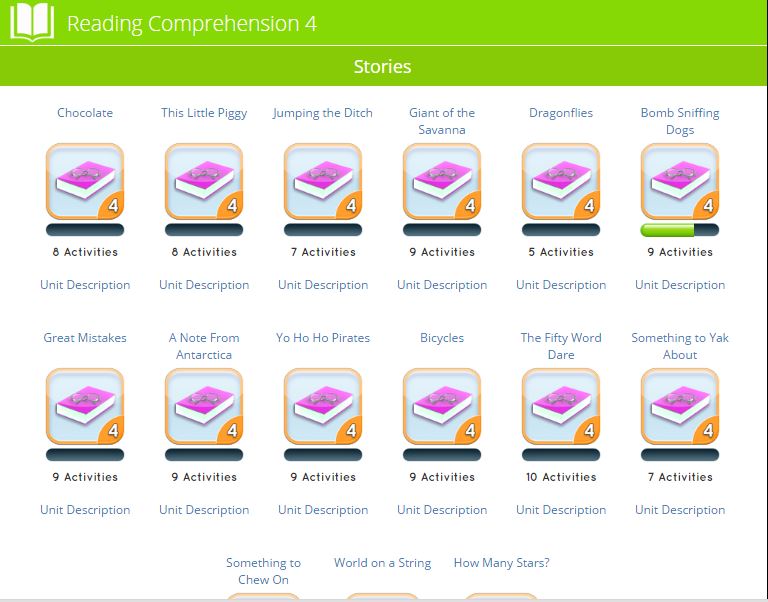
In reading comprehension, he is giving a list of stories (15 of them). Each story has a certain set of activities relating to that story. As you can see, some stories have more activities than others. Today, Little Britches is going to work on Bomb Sniffing Dogs.

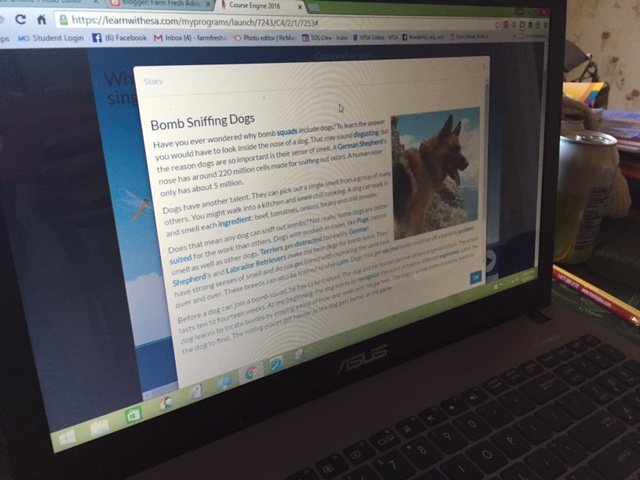
This set of activities opens up right on the activities themselves, NOT the story. So you have to click the little book icon in the bottom corner to read the story first.
While the story doesn't have an audio option, the vocabulary words or more tricky words are highlighted in blue, and they CAN be clicked on to hear pronunciation. When the story is finished, the student and exit the pop up window and then complete their activities relating to the story. Every completed activity earns a star.
By clicking in the top right corner on the star, they can see their collection of stars they earned for the unit. The height of the star depends on their scores. As you can see, Little Britches had some problems with sequencing.

When completed, the child can simply go to another unit in that category, or jump to another subject all together. There is a lot of freedom related to the order or activities to be completed.

Now that I have shown you the process of getting to an activity, I will just share a few screens from some of the other subjects we visited.

Baby Britches working on science with Little Britches to help with the reading
Baby Britches matching color words
practicing typing and spelling color words
1st grade math includes learning how to read an abacus
There are so many different activities in each subject and category. There is matching, spelling, multiple choice questions, writing, typing, fill in the blank, word searches, and so much more!

Now I want to talk about a few extras that ESA has included with the Complete Home Learning Suite! Back on the log in page, there is the option to view your students marks. This is just what it says--you get to see how they are doing in their progress! I am going to give you an example of what you can do in this section, using Little Britches' marks.

The first thing that pulls up is all of the programs that your child has worked on, and what level of completion is it at. You can see that it also shows you their average scores within those programs. But there is more! 
By clicking on any of the program names, I can open up a more detailed look at the work within the program. This shows me the units that have been completed, and more information about his scores. I can also print off a certificate for any units that have been completed.

Now, back to the previous photo--did you notice the report card icon? Yep! You can print a REPORT CARD for each program with detailed information about each unit. You can pick a grade, and write comments--personalizing it down to your teacher name and the school name.

When this report card is printed out, it gives all the information for each unit within that program including how much has been completed, the average score, and how well I think he did on it. It looks like a basic progress report card. 

As of today, we have explored Grades K, 1, 3, and 4 in the areas of reading, phonics, spelling, math, geography, and science. The boys have each completed over 50 activities within these areas.

What Are Our Thoughts?


Little Britches finds ESA boring. It's mostly all reading and he's not a visual learner. He would prefer the option of more audio for him--especially in the sections where there is reading to be done--like...reading. LOL. He doesn't mind doing the activities as long as they are things like matching...but he gets quickly bored with all the multiple choice questions. I have to struggle to get him to spend any time on this, even when he gets to pick whatever he wants to work on. It's just not a good match for him.

Baby Britches loves it. He's a visual learner and he loves anything that allows him time on the computer. He appreciates that at the Kindergarten level, he's able to work nearly completely independently. The only areas this isn't the case is in a few subjects where there isn't any audio for the questions. For example, in science, the student is supposed to read the question and read the answers and pick the right answer. But this is for KINDERGARTEN! They aren't going to be able to read this! Here is an example:

There needs to be an audio option for these because the average, or even the majority of the children in K-1 will not be able to do this by themselves without it. Little Britches had to sit with him for all of these in order for him to be able to complete them.

Secondly--if you look at this particular activity, it assumes the child has already learned about the states of matter. There is no LESSON. While I understand that this is a supplemental program, there should at least be a "crash course" review. This style continues throughout the science.

What about me? I love the principle of ESA and I think they have 
really done well to expand what they offer. But some of the material in the early grades for science especially, there needs to be less reading and more audio--and the font needs to be bigger. If you are going to have the 5-7 year olds read, make it big enough for them to be able to sound out all the letters.

My main issue with ESA--there is just too much reading! I would like there to be less reading, and more audio. Or a better mix of the two. Just because my 10 year old CAN read, doesn't mean he enjoys it, or can read easily on a computer screen. I would like to see the audio carried throughout the grades AND subjects. 

Secondly, the science and geography, both infer that there is previous knowledge coming into the subject activities, however, unless the parent has checked out the unit descriptions in advance, they aren't going to know this. I get that the program is supplemental, but I think there needs to be a bit more of a disclaimer regarding what is covered in the units.

I would also love (as would my hubby) to see more animation. The boys miss the "dancing dog" of the our previous review. I also find that the younger grades seem to have more photos and "fun" activities with colored images. That would be nice to see carried forward. Endless font is not enjoyable for any age. Thinking back to my previous comment--it would be nice to have a video for the child to watch before they answer the questions on science. That would be a great "review" for them before tackling the unit activities.

As for content--it's chock full of content! I really like what is covered in this website. It's HOW it's presented that I think needs to be re-evaluated. The site is supposed to be for all types of learners, so that needs to be evident throughout the grades and subjects. Visual is covered...but auditory definitely needs to be represented more.

Will we continue to use this product?
Maybe. I will leave it up to the boys. I have a feeling that Baby Britches will, but Little Britches will not. 

Would I Recommend This Product?


If you are looking for a "busy time" website where your child and go to reinforce concepts they already have learned, without needing much of your help, then do consider this site. If you are looking for something to TEACH your child concepts, this is not the site for you. I do not think that it "teaches" anything, but then I do not believe it was designed to. This is ideal for a visual learner, but if your child doesn't like to read very much, I would suggest something different. Price wise, if you plan on using it for a child who is very visual and loves this type of busy work, then it probably is worth it. If you are thinking that this would be something to use now and then--I don't know that it would be a good choice for the cost, unless you have SEVERAL students who would be using it. The price points are much lower the more students you add on.

Want to Know More?

We reviewed the Complete Home Learning Suite from Essential Skills Advantage. We have mixed opinions on it, so make sure you go check out how other families used it for a better idea on what is offered!
Essential Skills Advantage Review
You can stay in touch with ESA on these social media outlets:
Facebook: 
https://www.facebook.com/skillsadvantage/

Twitter: 
https://twitter.com/SkillsAdvantage 
@SkillsAdvantage

Pinterest: 
https://www.pinterest.com/SkillsAdvantage

LinkedIn: 
https://www.linkedin.com/company/skillsadvantage

Blog: 
http://buyesa.com/blog/

***
In summary, the new ESA program has expanded to include some very awesome stuff! It is a very good program, but only for those who learn or can complete work in the style it's presented. While my oldest is bored with the program and probably won't use it, I will definitely be keeping it around through the rest of my subscription to use with Baby Britches. This will allow me to work with his big brother on other things, while he works independently. So it's still a win-win!
 photo 2015blogsiggy_zpsfy0kfo4t.png


August 26, 2014

Essential Skills Advantage: Online Reading Program (Curriculum Review)

One of the things we discovered this year is that both boys do well with online educational programs. They have been working on their keyboarding and mouse skills while learning history, math or English. When I had the chance to review Essential Skills Advantage, an online reading and language curriculum, I had a feeling both boys would be happy to help me with this one...and I hoped they would be able to learn new things while they did it!


Product Details

Essential Skills Advantage Review
Essential Skills Advantage is an award winning online reading program that has been helping 300,000+ students achieve reading excellence. The company began as a reading program in schools, helping over 20,000 schools teach reading and language, but due to increased demand they released their program for home use too. They focus on a core reading curriculum of phonics and sight words that uses key strategies for retention and success. The program was designed by experienced teachers and educators to align with core curriculum requirements--something lacking in other online educational systems.

The software has been designed to allow for easy navigation at the users own pace. It is fully interactive and has been designed to guide the student through lessons with games and activities that are guaranteed to not be found in "traditional" education.

There are no cds, discs or other materials required beyond the online program. The only things you need are a computer, mouse, keyboard and internet connection.(*We have high speed internet and had no issues and few glitches)

The program is geared for students in Kindergarten up to 6th grade, but would be great for remedial work too.

Essential Skills Advantage offers a subscription to their full program (all grades all levels) for $9.99/month per student.

I received a year subscription to the full Essential Skills Advantage program for my review. 

How Did We Use This Product?

I received our set up and log-in information from the company via email and using the links provided was able to quickly set up profile accounts for my family. I set up each student with their own username and password.

I saved the "shortcut" url address that they gave me so that I could have my boys go right to the main menu.
A Screenshot of the Main Menu Page
You can see the full range of levels here...there are complete reading units for grades K-3, three levels of spelling, reading comprehension for levels 4-6, Vocabulary Builder for levels 4-6, Spelling for grades 4-6, Grammar for grades 3-5 and spelling stumpers for levels 1-9.

Your child gets started by simply clicking on one of these units. Little Britches stuck with the 3rd grade reading, and fun with spelling level 3. He didn't wander into any of the other units, but there is MORE than enough to keep him busy in the two he has been checking out. Baby Britches stuck with the Reading for Kindergarten.

When they click on their unit choice, it will ask them to log in. 
This is using the username/password you set up for each of your students. They will have to use this log in anytime they change units on this main menu, but once they log in, they do not have to log in again within the unit.

Each unit is set up with different lesson sections in a unit menu. 

The stars after the lesson units demonstrate how much of the lesson has been completed. You can see that Baby Britches has completed all of his Readiness Skills and some of his Phonics, while Little Britches has completed quite a bit of his Vocabulary Builder.

Within each lesson unit is another menu of focused skills relating to that lesson topic. For instance, if you click on Baby Britches "Phonics" it will take you to a menu that has the topics "Alphabet, Phonetic Awareness and Consonants". Then by clicking on any of these you will find the actual activities to be completed. Sometimes there are only 2 or 3 and sometimes there are 20+. As the student completes each section they get marked with stars to show that they have been completed.

A menu from Picture Vocabulary as part of Readiness Skills for Grade K

A menu from Group A as part of Reading Comprehension for Grade 3
At anytime, your student can check their star count by clicking the blue star button in the upper right corner of the screen.
Star count for Reading Comprehension Group A
If the student has received an 80% or better on the activities they will have a gold star. If it is below 80% they will have silver stars. You can see that it also tells you how much has been completed for the lesson. Both boys LOVE to count their stars.

So what would a lesson look like? Here are some examples from each of the boys units based on what they have completed thus far...

Baby Britches has to click BIGGEST to SMALLEST.

Baby Britches has to click the photos that are opposites of each other

Baby Britches has to click on the black letter combo that matches the pattern

Little Britches has to click on the photo that matches the word he heard
Little Britches has to find the compound words in this word search

Working on his word search

Little Britches has to match the shadow shapes of letters to the actual words

Little Britches has to read a short story and then answer questions about it
And there is so much more...SOOOO much more.

When the boys would work on their program, each boy spent about 20 minutes 4 days a week and completed whatever they wanted in their program within that period of time. There were certain activities that each of them preferred over the other and sometimes they would seek out those specific ones in their lessons and only work on them.

Now I want to just give you a peak at what some of the other main menu units contain, even though we didn't do them very much or at all.

Vocabulary Builder--Grades 4-6 (all have same main menu--different level activities)
Reading Comprehension Grades 4-6
Each of these have a menu of 10+ stories. Each story has activities (at the bottom) that are related to the story.
Grammar for Grades 3-5 Subject Menu

Spelling Stumpers 1 to 5

Fun with Spelling Level 3
I think you can see from these examples what a broad range of activities and subject matter is covered within the realm of this reading and language curriculum.

But wait...there's more!

Under the parent profile, you can view the marks for each of your student in all the areas that they have completed or are working on.
This unfortunately is NOT printable. From what I can see, the only thing that is printable (without doing a screenshot to print later) is the certificates that they can earn.

Did I just say certificates? Yep!

Once your student has completed an entire section of a lesson unit, they are able to get a certificate. You will know when they have earned one when they hit a 100% on their marks...but it also will say "download certificate".
Baby Britches has earned two certificates which you can see here...clicking the words gives you the pdf to print

What Are Our Thoughts on the Product?

Little Britches:
"I like it. But here is what I don't like about it...when you finish one of the screen full of boxes you should get a certificate instead of having to complete the entire lessons worth of boxes. There are too many activities to be done before getting a certificate. My favorite activity was the memory match game."

Baby Britches: 
He loved doing this program. He would do it as long as I let him and he didn't care if he had already completed things or not. He loved the "dancing doggy" that appeared whenever he completed something and he was in LOVE with his certificates. He really excelled with this program.

Me:
This program is very user friendly. I found it colorful and fun. Once you get your special url after you register you (as the parent) don't have to pre-log in for your children to get access. Each child can simply log in themselves in the level they need.

I think the program is very clever and interesting. I like how there are different groupings within each topic. I think the fonts are written very easy to read. I like that in the reading comprehension stories, my student can click the bold vocabulary word to have it said to learn pronunciation--and I love that they HAVE reading comprehension.

I like having a place to work on spelling and then another place to deal with grammar that is separate from the rest of the reading program.

I like that in the Kindergarten level, the student is able to listen to anything they need to over and over again with the "ear" icon. This is very helpful.

I think the graphics are fun and my boys both love uncovering the hidden pictures in the Memory matching games. 

My boys love checking their star counts and really get tickled by the "dancing dog" that celebrates when they have finished their lesson.

I believe that out of the two of them Baby Britches is the one showing the most fluency and enjoyment. I CANNOT keep him off of it. He doesn't care if he gets everything wrong...LOL. But he has gotten a REMARKABLE amount of activities right with little instruction. He's just turned 4 years old but is rocking the Kindergarten level. There ARE some things he can't do yet (rhyming, opposites, sigh words, etc) but he has amazed me with what he CAN do and what he's picked up. 

Even though there are some areas that are beyond his level right now, MOST of the activities are in his realm of capabilities and with just a little guidance with me he's able to whiz through them.

I think this is because there is an even mix of verbal and visual instruction and activity. 
THAT is something that I really want to mention. I think that this program really strives to hit the different learning methods. It is definitely visual, but a vast majority is also auditory. When you put that with the keyboard entry and mouse usage, you've touched on all three areas. This is why it works for both my boys right now.

Is there anything I would change?

#1 Eliminate the nature sounds.
While the curriculum is being done there is a repetitive sound of nature...like chirping crickets and birds. It is ALWAYS there, even when the narrator speaks. I wish there was an option to turn off the nature sounds but I haven't found it yet. You can't mute the sound because so much of the lesson is auditory.

#2 Make it a little easier to get certificates in the higher grades
Baby Britches has already completed four full units so he's received four certificates and he's on his way to his fifth. 

Little Britches however has LONG units with multiple sections and every section has to be complete before a certificate is given. Sometimes this means completing 30+ sections. He got lucky when he did "similies" because there was only 2 sections and he received a certificate. I think that there should be no more than 20 sections before the student can receive a certificate. (If you remember, Little Britches definitely agrees with this one.)

#3 The cost. 
I think that $9.95/month is very reasonable price for what is being offered in this curriculum. But $9.95 per month PER student is too much. Especially when you might have a family with 2+ children who want to use the program. That makes it almost $20 per month for a family with 2 children...calculate that out over a year and that's $238. When you keep adding on another $9.95 per student, the cost begins to be prohibitive quickly....unless you think that is a great deal and paying $119 per student for a years worth of reading/grammar/vocabulary lessons is in your budget. It's not in mine and I know it's not in the budget of my friends with 3+ children...no matter how much they would like to try it.

I would love to see a FAMILY price so that parents with several children don't have to pay beyond a certain amount to use the program. Or maybe even a discount that increases as you add on more students.

Will we renew our membership at the end of our year trial? Probably not. At this time I can't justify paying $9.95 per student per month to continue it....no matter how much they love it.

#4 Printable reports
 I like that you can view all the marks that they have received and see where they are in the program. I'd love to see a way to print off the scores that our child receives for my records.

#5 The Student Log-In
I wish that it was possible that once your student logged in, they would STAY logged in for each section they completed. As it is now, if they chose to go out of the reading and into the spelling or grammar, they have to re-log in. This was something that Little Britches grew annoyed with very quickly when he wanted to hop around in the program.

Would I Recommend Essential Skills Advantage?

I think this curriculum is very well done. I don't think that I would personally use it as an "exclusive" reading program---even though I do think that it covers what a full curriculum would cover. It's just not something I would use because I don't personally like to use JUST a computer for reading. 
This program is going to be useful for anyone needing to give their kids reading and language skills a boost outside of the traditional teaching style. This would be a great program to do for summer education to keep them "from getting rusty"--something we've been using it for as part of our review. There is a LOT of information covered. A LOT. And for some I think there is more covered than would be in certain curriculum. And if your child does better working on a computer, this is definitely something to continue.

I definitely recommend this program for the Kindergarten level. I was frankly shocked at how much Baby Britches picked up and how quickly he maneuvered through the program though he's not had any "formal" schooling. If you want to give your 4-6 year old a real boost in their reading/language skills I would definitely consider this program.

BUT-----if the price is what would deter you, you are in luck right now!

Essential Skills Advantage has started to offer a sponsored version of their program that is completely free. You can sign-up completely free at www.ESAlearning.com. Members can enjoy access to every course ESA has to offer, but there will be sponsored advertising in the parent portal.

I received the Essential Skills Advantage premium plan which retails for $9.99/month but if you use the code TOS50, you can get 50% OFF the monthly membership fee...AND the 50% off discount will apply as long as you remain a member---that's taking it to just $4.99/month/student! I think this is a much more reasonable per student price--especially for the larger families!

But you will have to act quickly--the code is only good for anyone who signs up for the Premium Plan until October 1, 2014. So take advantage of this great deal!

Want to Learn More About Essential Skills Advantage?

I used Essential Skills Advantage ($9.95/month/child--$4.99/month/student with limited time offer code!) with both of my children in levels K and 3rd. Why don't you check out what the 49 other reviewers did with their children? Several of them used the older grade levels available!
Click to read Crew Reviews

You can stay in touch with Essential Skills Advantage and get information about updates, new products and sales with their social media outlets:

Facebook: http://www.facebook.com/skillsadvantage
Twitter: http://twitter.com/SkillsAdvantage
Pinterest: http://www.pinterest.com/SkillsAdvantage/
Google+: https://plus.google.com/u/0/103081493030185524648/about

**
As we gear up to start our new year, I definitely see us continuing to use this program with each boy...but I'm thinking that it would be fewer times per week...except for Baby Britches. He loves it so much I think this would work well when I need to do one-on-one time with Little Britches!

I am going to give you a break from sharing reviews until the end of next week...which means I can focus on some other posts like what our curriculum for 2014-2015 is going to look like, some recipes (yay!), book review (yay!) and who knows what else!

Hope to see you back soon!

 photo namegraphic2_zps8625728e.png