Showing posts with label fourth grade. Show all posts

May 31, 2016

Essential Skills Advantage: Online Curriculum for grades K-6 (Product Review)

I am always looking for new educational websites that help reinforce the things we are learning in our studies. Back in 2014 we reviewed Essential Skills Advantage when it was just an online reading and language curriculum. This year we were given the chance to review the online subscription to the Complete Home Learning Suite by Essential Skills Advantage which adds in subjects like social studies and science to their already existing online curriculum. I was curious to see how the boys would like it and if it would useful to us.
Complete Home Learning Suite from ESA~ Product Review

Product Information

Complete Home Learning Suite is an online subscription by Essential Skills Advantage (aka. ESA). It offers the subjects reading, spelling, language and grammar, geography, math, and science. There are complete programs in reading and math for grades K-3. There is work for grades 4-6 in reading and math as well, but they are not complete programs. Spelling work is available for grades 1-6. Language and Grammar has work for grades 3-6. Geography is geared towards grades 3-5, and science for K-3. ESA boasts of thousands of activities that support visual, auditory and tactile learning styles, and their program allows each child the opportunity to work independently and at their own pace.

Included in the subscription is a marks manager that allows the parent to stay up to date on each student's progress. The program is not CC aligned and is a supplemental program.

Pricing is available by month, 6 months, and full year, and varies depending on how many students are participating. For a monthly subscription for 1 student, you would be looking at $7.99/month. If you chose a yearly plan for that student, the price is $69.99, a 27% saving. Pricing is available for up to 10 students.

ESA was designed for your laptop and tablets, and is not optimized for smart phones. Internet is required with a good connection of 3G or better.

We were given a one year subscription to be used with Baby Britches (age 5) and Little Britches (age 10).

How Did We Use It?

Because we have experience using ESA before, it was simple to get it set up. They added my new subscription information back into my account, and other than doing a bit of tweaking for each boy's profile, we were good to go. The navigation was similar, but allowed for more customized options. Now each boy can click on the grade level they are using and go from there.

I gave each boy full independence on what they wanted to do, as long as they checked out several of the subjects included. When I log in, I get a basic "classroom" screen that gives me each boy's account. From here, they can simply click their name and continue. I have the ability for them to log in separately with their account information, but since they typically work on this back to back, a standard log in to my parent account works fine as a starting point.

To give you an idea on how the program works, I will follow you through a log-in of Little Britches:
 This is the main menu for all subjects. Today, he decided to do reading, so he clicked it.
Here is the reading menu, clearly divided into all the grades that have reading work. He clicked on Grade 4.
 Grade 4 only has a two option menu. Today he decided to do reading comprehension.
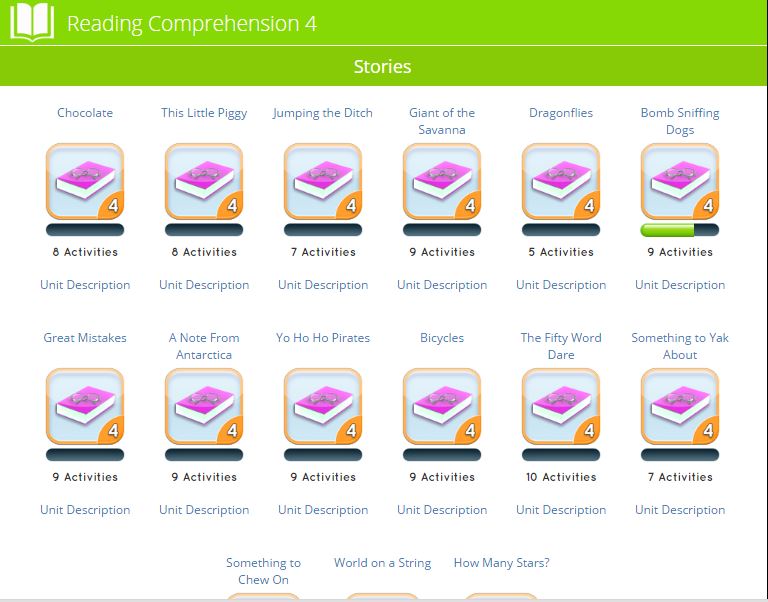
In reading comprehension, he is giving a list of stories (15 of them). Each story has a certain set of activities relating to that story. As you can see, some stories have more activities than others. Today, Little Britches is going to work on Bomb Sniffing Dogs.

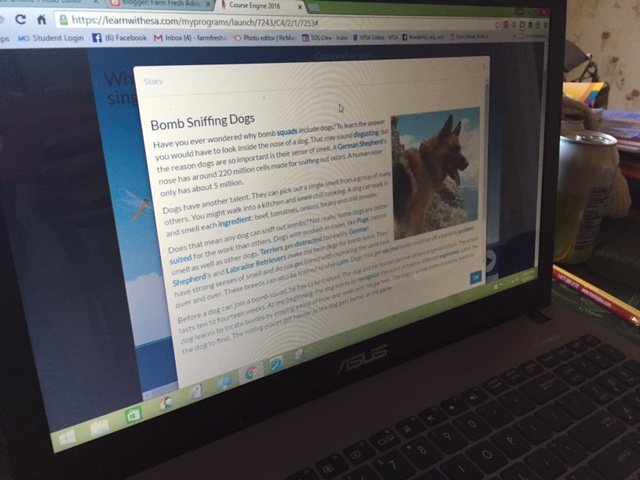
This set of activities opens up right on the activities themselves, NOT the story. So you have to click the little book icon in the bottom corner to read the story first.
While the story doesn't have an audio option, the vocabulary words or more tricky words are highlighted in blue, and they CAN be clicked on to hear pronunciation. When the story is finished, the student and exit the pop up window and then complete their activities relating to the story. Every completed activity earns a star.
By clicking in the top right corner on the star, they can see their collection of stars they earned for the unit. The height of the star depends on their scores. As you can see, Little Britches had some problems with sequencing.

When completed, the child can simply go to another unit in that category, or jump to another subject all together. There is a lot of freedom related to the order or activities to be completed.

Now that I have shown you the process of getting to an activity, I will just share a few screens from some of the other subjects we visited.

Baby Britches working on science with Little Britches to help with the reading
Baby Britches matching color words
practicing typing and spelling color words
1st grade math includes learning how to read an abacus
There are so many different activities in each subject and category. There is matching, spelling, multiple choice questions, writing, typing, fill in the blank, word searches, and so much more!

Now I want to talk about a few extras that ESA has included with the Complete Home Learning Suite! Back on the log in page, there is the option to view your students marks. This is just what it says--you get to see how they are doing in their progress! I am going to give you an example of what you can do in this section, using Little Britches' marks.

The first thing that pulls up is all of the programs that your child has worked on, and what level of completion is it at. You can see that it also shows you their average scores within those programs. But there is more! 
By clicking on any of the program names, I can open up a more detailed look at the work within the program. This shows me the units that have been completed, and more information about his scores. I can also print off a certificate for any units that have been completed.

Now, back to the previous photo--did you notice the report card icon? Yep! You can print a REPORT CARD for each program with detailed information about each unit. You can pick a grade, and write comments--personalizing it down to your teacher name and the school name.

When this report card is printed out, it gives all the information for each unit within that program including how much has been completed, the average score, and how well I think he did on it. It looks like a basic progress report card. 

As of today, we have explored Grades K, 1, 3, and 4 in the areas of reading, phonics, spelling, math, geography, and science. The boys have each completed over 50 activities within these areas.

What Are Our Thoughts?


Little Britches finds ESA boring. It's mostly all reading and he's not a visual learner. He would prefer the option of more audio for him--especially in the sections where there is reading to be done--like...reading. LOL. He doesn't mind doing the activities as long as they are things like matching...but he gets quickly bored with all the multiple choice questions. I have to struggle to get him to spend any time on this, even when he gets to pick whatever he wants to work on. It's just not a good match for him.

Baby Britches loves it. He's a visual learner and he loves anything that allows him time on the computer. He appreciates that at the Kindergarten level, he's able to work nearly completely independently. The only areas this isn't the case is in a few subjects where there isn't any audio for the questions. For example, in science, the student is supposed to read the question and read the answers and pick the right answer. But this is for KINDERGARTEN! They aren't going to be able to read this! Here is an example:

There needs to be an audio option for these because the average, or even the majority of the children in K-1 will not be able to do this by themselves without it. Little Britches had to sit with him for all of these in order for him to be able to complete them.

Secondly--if you look at this particular activity, it assumes the child has already learned about the states of matter. There is no LESSON. While I understand that this is a supplemental program, there should at least be a "crash course" review. This style continues throughout the science.

What about me? I love the principle of ESA and I think they have 
really done well to expand what they offer. But some of the material in the early grades for science especially, there needs to be less reading and more audio--and the font needs to be bigger. If you are going to have the 5-7 year olds read, make it big enough for them to be able to sound out all the letters.

My main issue with ESA--there is just too much reading! I would like there to be less reading, and more audio. Or a better mix of the two. Just because my 10 year old CAN read, doesn't mean he enjoys it, or can read easily on a computer screen. I would like to see the audio carried throughout the grades AND subjects. 

Secondly, the science and geography, both infer that there is previous knowledge coming into the subject activities, however, unless the parent has checked out the unit descriptions in advance, they aren't going to know this. I get that the program is supplemental, but I think there needs to be a bit more of a disclaimer regarding what is covered in the units.

I would also love (as would my hubby) to see more animation. The boys miss the "dancing dog" of the our previous review. I also find that the younger grades seem to have more photos and "fun" activities with colored images. That would be nice to see carried forward. Endless font is not enjoyable for any age. Thinking back to my previous comment--it would be nice to have a video for the child to watch before they answer the questions on science. That would be a great "review" for them before tackling the unit activities.

As for content--it's chock full of content! I really like what is covered in this website. It's HOW it's presented that I think needs to be re-evaluated. The site is supposed to be for all types of learners, so that needs to be evident throughout the grades and subjects. Visual is covered...but auditory definitely needs to be represented more.

Will we continue to use this product?
Maybe. I will leave it up to the boys. I have a feeling that Baby Britches will, but Little Britches will not. 

Would I Recommend This Product?


If you are looking for a "busy time" website where your child and go to reinforce concepts they already have learned, without needing much of your help, then do consider this site. If you are looking for something to TEACH your child concepts, this is not the site for you. I do not think that it "teaches" anything, but then I do not believe it was designed to. This is ideal for a visual learner, but if your child doesn't like to read very much, I would suggest something different. Price wise, if you plan on using it for a child who is very visual and loves this type of busy work, then it probably is worth it. If you are thinking that this would be something to use now and then--I don't know that it would be a good choice for the cost, unless you have SEVERAL students who would be using it. The price points are much lower the more students you add on.

Want to Know More?

We reviewed the Complete Home Learning Suite from Essential Skills Advantage. We have mixed opinions on it, so make sure you go check out how other families used it for a better idea on what is offered!

Essential Skills Advantage Review
You can stay in touch with ESA on these social media outlets:
Facebook: 
https://www.facebook.com/skillsadvantage/

Twitter: 
https://twitter.com/SkillsAdvantage 
@SkillsAdvantage

Pinterest: 
https://www.pinterest.com/SkillsAdvantage

LinkedIn: 
https://www.linkedin.com/company/skillsadvantage

Blog: 
http://buyesa.com/blog/

***
In summary, the new ESA program has expanded to include some very awesome stuff! It is a very good program, but only for those who learn or can complete work in the style it's presented. While my oldest is bored with the program and probably won't use it, I will definitely be keeping it around through the rest of my subscription to use with Baby Britches. This will allow me to work with his big brother on other things, while he works independently. So it's still a win-win!
 photo 2015blogsiggy_zpsfy0kfo4t.png


March 16, 2016

Rainforest Journey from EdTechLens {Curriculum Review}

We have really become a family that enjoys online curriculum. While we don't exclusively use it, there are several subjects that I have found it to be helpful and provides independence for the boys, which they love. One of those is science, and we have had success with a few different online curriculum in this subject. When we were given the opportunity to review Rainforest Journey from EdTechLens, I hoped that it would be another enjoyable online science curriculum for the boys.


Product Summary

Rainforest Journey is the K-5th grade online science curriculum created by EdTechLens. Rainforest Journey teaches the life sciences portion of an elementary school science curriculum, though it is not a complete life sciences curriculum. There are 34 lessons (5 thematic units) consisting of text, real life photos, expert interviews from scientists and naturalists, video clips, lesson reviews, unit reviews, and hands on field tested activities. Each grade covers the same topics under the umbrella theme of the rainforest, but has increased complexity. The assessments are a mixture of multiple choice and open ended discussion topics. 

Rainforest Journey is aligned with NGSS and with the New York State Science standards, though other state standards will be added in the future. 

Rainforest Journey works on any device connected with the internet, and all program materials can be printed. The program is desktop, laptop, tablet, mobile, and even school smart board compatible.

Rainforest Journey is a one year online subscription available for $50.00 (per grade level course), with the option for a 50% discount for the second user if 2-5 students are using the same grade level. This would be good if you had a co-op doing the same grade, or if you had twins, or two children both doing the same grade level.  If you have children in different grade levels you would need to purchase the single user accounts for each child.

We were given the Rainforest Journey for Kindergarten and Fourth Grade level.

How Did I Use This Product?

My subscription information arrived via email with directions on how to set up my classes. Because I needed to get a level for each of my students I changed my "quantity" to two in the checkout. I continued with all the screen prompts and processed my order. When I logged back in, I went to my classes, and there were each of the subscriptions I had ordered. NOW I was able to denote the grade levels for each boy, picking Kindergarten for Baby Britches and 4th Grade for Little Britches. The company picked a user name for each boy, although I got to set up the password. Looking around, I can see that in "Manage My Classes" I will be able to keep up with how each student is doing--including their quiz/test scores and progress.

I have access in Teacher Resources to all the lesson reviews for each unit, quiz answer keys, and template lesson plans. There is also a support menu which provides a user guide and quick start guide which are both very useful for getting started. I discovered that I had access to all the information of the course including the vocabulary, illustrations, and activities. I can view them in advance to be able to answer any questions. I can also use the vocabulary list to reinforce the words. I have the option of setting the course to be sequential, or open. This is the difference of making the student work in order, or allowing them to pick and choose what unit/lesson they want to do. I set ours to be sequential.

One of the most useful things to help me get started was a link to a Knowledge Base which sort of is a FAQ page. It's definitely a must do before starting the program, because it asks almost every question one might have about using the program.

Because each boy had their own log-in, and we only have one school laptop, they have to take turns doing their lesson. Once each boy logs in, the lesson begins at their last stopping point. Each unit (There appear to be 5 units) has 2-5 lessons. Each lesson has a lesson review. Each unit has a set of three types assessments . The lessons are comprised of photos, videos, text, and optional audio reading of the text. The Kindergarten lesson is short and has only a couple lines. The 4th grade level has full paragraphs of text.

This is a lesson from Unit 3 for Kindergarten. There is a photo of a turtle. Below that, the student can either read the text, or click the audio icon on the left for each and have it read to them. 
I have been overseeing Baby Britches' use of the program, but Little Britches does 1-2 lessons in each sitting. We have the option to either let him print out the lesson review as he needs it, or I can print them out in advance. For right now, I have been printing them out in advance. After he completes his lesson review, I look over it and just staple them all together. There is no recording of any lesson review scores in the program at this time. There were several lesson reviews that I just let him explain the answer orally since he really dislikes writing.

Each of Little Britches reviews consist of 2 or 3 open ended questions. All the lesson reviews include a question that has them reference things from the lesson they just read/listened to. The other questions may be apply their knowledge to answer a question about something a little different.

For instance, the first question might be "Briefly describe how different plants and animals in the rainforest protect themselves", while the second question would be "How does the human body protect itself?" (4th grade, Unit 2, Lesson 4 review)

Baby Britches' lesson reviews are different since they are the Kindergarten level. They consist of having him fill in blanks with letters to make a word. A short answer question. Composing a sentence using the words provided. Drawing a picture of some kind relating to the lesson. These were easy for him to complete with minimal help from me--I simply read the question. 

When the unit is completed, there is a series of three assessments. This was the same for each of the grade levels. They consist of a multiple choice Depth of Knowledge assessment, an Open Ended Assessment, and a Factual Assessment. The Depth of Knowledge and Factual Assessment are both multiple choice based on lessons from the unit. The open ended assessment is just that--open ended questions relating to the lessons, or using the knowledge to take something further. 
Taken from Unit 1 Depth of Knowledge Assessment for Kindergarten

A matching question from the 4th grade Unit 1 Depth of Knowledge Assessment

A question from the Kindergarten Open Ended Assessment for Unit 3

Finally, there is a hands-on activity for each unit. This is in the style of an experiment, or a series of activities depending on the grade level. You can find a complete teachers guide for doing the activities in the parent log-in/Teacher resources. These activities are meant to be done over 1-2 days.
As of today, Baby Britches is in the middle of Unit 3 and Little Britches is working through Unit 2. We have done Rainforest Journey 2-3 days a week with each boy completing 1-3 lessons per day.

What Are My Thoughts About the Product?


Little Britches: "I like the videos, and the photos, but I don't like having to do a lesson review after each lesson. I hate writing and I hate open ended questions. There also are not enough experiments. I can't believe we've only had one even though we've been working through it for several weeks! And I'm bored with it still being about the rainforest. "
Baby Britches: "I love my science! I like the videos and the pictures. I think it's easy. But more experiments. I want to DO more stuff."
My Thoughts:
In relation to the overall program--there are not enough experiments or hands-on activities. Just one per unit is NOT enough. If it takes a couple weeks to get through one unit, that is just two experiments per month. I would like to see the Kindergarten level have more hands-on stuff. I know the activities are meant to be used over a couple days, but I still think there needs to at least be small experiments throughout the program to keep it interesting.
I also definitely think this program is geared first and foremost to the classroom. It just has the feel of a normal old science unit my biology teacher would give me. 
I really like the videos and photos, but I would change how they are on the page. For instance the photos/videos are very large, and then the text/lesson about them isn't until the bottom of the page. And then my boys had to scroll back up to see the photo or video that matched whatever the lesson was. I think that it should be a photo/video, and then right below it should be the lesson information pertaining to it. Or, the photos should be a bit smaller, since they can be clicked on and made larger as it is. 
I appreciated the audio aspect for the lessons. This allowed my auditory learner to have a break from reading (Little Britches), and it gave my Kindergartner independence because i didn't have to read it to him. 
Lesson reviews--I would have appreciated a lesson review every 2 lessons or so--especially when a lesson was just one page on the program with two simple short audio clips. I think it would do better having them combining the shorter lessons into one. 
The lesson reviews for the 4th grade level could have been better if they hadn't of been exclusively open ended questions. I think that if they had included some aspects of the Kindergartner version (specifically, the drawing), my son would have enjoyed it more. 
Assessments. I found that having three different assessments was too much. I also think that since the lessons are audio capable, the assessment should have audio capabilities especially for the Kindergarten level. He could not complete the assessments on his own because I had to read all the questions and answers. Not only that, but open ended for Kindergarten is sort of pushing it. 
Especially because there was a space for them to type their answer. My Kindergartner can't type yet, and he is still learning how to write in general. I had to have him dictate and then I typed his answer for him. At the Kindergarten level, I think a simple multiple choice test or matching test would be the best choice.
Another thing I noticed--you can't skip the assessments. Some homeschooling families don't do tests like this for grades, and it would be nice to have the option to discontinue the assessments if we don't want them. 
And here are a few odds and ends:
*Would like the ability to change the username to something we can easily remember instead of using the one assigned, as it was very random and not easily remembered. Trust me. LOL. 
*Would like there to be more videos, especially for the Kindergarten level.
*Would like there to be some vocabulary review or games included, instead of just being given the list of vocabulary words.
*I liked the ability to let Baby Britches work through on his own thanks to the audio lessons. 
*I liked that the assessments were a mostly multiple choice right from the lessons themselves.
*I think the lesson reviews for the Kindergarten were well done especially when they were a mix of words, writing, and illustrating. 
*I really enjoyed the mini bios on plants and animals of the rainforest, including the real photos and videos. Both boys enjoyed learning about new creatures--the bullet ant is probably the favorite thus far.
Now, before I finish, let me mention some things about the teachers portion of the curriculum:
* I appreciated being able to break down each unit by lesson and to be able to see what will be taught.
* I appreciated having the ability to print all the lesson reviews in advance from the teacher resources.
* I appreciated having a teachers guide and student guide for all the hands-on activities and the ability to print them off.
* I appreciated the ability to print off the assessments if I desired, though we just completed them online. 
* I like that on the open-ended assessment, there were suggested answers from EdTechLens that allowed me to gauge how my child answered to what some other answers could be accepted. 
* I liked being able to write a note for each open-ended question--this allowed me to compliment Little Britches on his answer, but also point out how it could have been better if need be.
* I also appreciated being able to grade the open-ended assessment myself.
* I think that it's great to be able to click directly on a lesson, vocabulary page, or illustration page instead of having to click through an entire unit to find what I needed.
* Having the test average makes it easy for me to log a grade (if I need to)
* I also like being able to see how far along each child has gotten in their course work and how much is left. 
Show early progress for Little Britches

Shows current progress for Baby Britches
* I found that that lesson planning guide was helpful--but it really was geared to a classroom setting, and not one I would use for homeschool.
* Though I expected it, I was bummed to hear references to evolution--however, it was not as in your face as a lot of other science curriculum can be. But I knew going in this was not a Christian science program.
*I found the program to be very easy to navigate and figure out on my own.
In summary, I found that this program was designed first and foremost for a classroom setting. In its present form, it would not be a full curriculum, but it is acknowledged by the company that it is not. I think that for the most part it is grade level appropriate, however a few tweaks could be made for the Kindergarten level to make it better (like the open ended assessment). The boys were able to work on their individual courses almost entirely independently which is good, however I think there should be a few lesson lesson reviews. The photography and videos are superb and the information is well thought out and presented....my main thing though---it's basically a digital textbook.--and in general we try to avoid textbooks in our homeschool. I think there should be more experiments/hands on activities included in each unit to keep it more varied and interesting. If it had been video heavy with dialogue (think nature documentary style), it would have been much more like what we enjoy for online science.
If you didn't have your child do the lesson reviews, or the assessments, a child could finish this course in a matter of maybe 3 weeks. With that in mind, the price doesn't fit that scenario. However, if you allowed your child a limit of 1-2 lessons per day, and included the activities, reviews and assessment you have a very good program that will last about 3ish months. Again--it's not a full curriculum. 
As an aside--it could be MADE into a full curriculum, if you chose to add more reading, videos, games, activities relating to the theme--something it would be pretty easy to do.
Will we continue to use this product?
I will probably continue to use it for Baby Britches because he really likes it. Little Britches isn't as fond, so I will ask him if he wants to finish it, or go back to what we were using before. I really don't know which he will pick. LOL.

Would I Recommend This Product?

I'm not quite sure how to recommend this product in relation to who would like it. I guess it's a spin on the more traditional method of teaching science with worksheets, assessments, and lessons--just that the lessons are in digital form and the child could work through it on their own. If you prefer something without a lot of experiments, then this would be a good match. If you like flushing out a single theme into several different units, this would probably be a good match (As it's all about the rainforest). If you want each child to be learning the same information, but at their own grade level, this would be good for you. If you prefer online learning, this would be a good match.
But. If you want to avoid evolution completely, this won't be a good choice. If you want a lot of hands-on with science, this won't be a good choice. If you want limited assessments and worksheets, this won't be a good choice. If you are seeking a complete curriculum, this won't be a good choice. If you have limited internet, this won't be a good choice.

Want To Know More?

Our family reviewed the Rainforest Journey (K and 4th grade) from EdTechLens and we enjoyed the program! Why don't you go visit some of the other crew members to see what their grade level looks like and how they used the program!
Rainforest Journey EdTechLens Review
If you would like to stay in touch with Ed Tech Lens, make sure you connect with them via these social media outlets:
Twitter:  https://twitter.com/edtechlens
Facebook: https://www.facebook.com/edtechlens
Pinterest: https://www.pinterest.com/edtechlens/
Google +: https://plus.google.com/+Edtechlens
LinkedIn: https://www.linkedin.com/company/edtechlens
***
This program wasn't quite what I was expecting, and not the best fit for our family. We prefer programs where I can do one lesson for both boys, where it is short and includes a lot of hands-on activities, without a lot of testing or worksheets. We did however, really enjoy the bios on different animals and plants, and seeing the videos and photos. So while it's a very well done program--it's just not the right thing for us. 

***
 photo 2015blogsiggy_zpsfy0kfo4t.png